
IGET
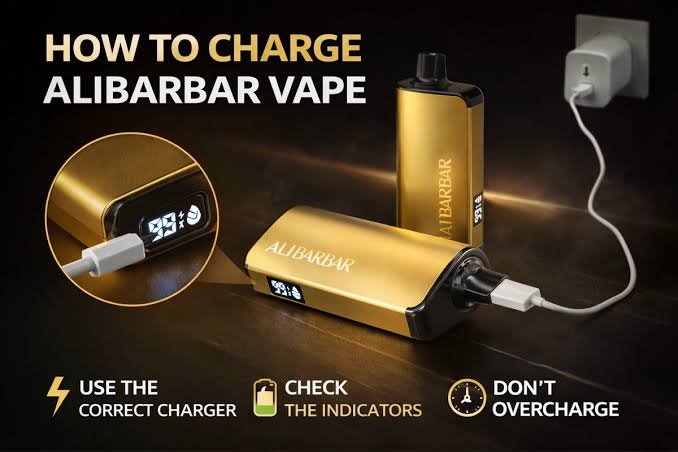
how to charge alibarbar vape ingot 9000
Oct
How to Charge ALIBARBAR Vape Ingot 9000: A Complete Guide
The ALIBARBAR INGOT 9000 is a high-capacity disposable vape that has attracted attention because of its long-use design, compact form, and large e-liquid capacity. One of the most common questions surrounding the device is simple: how to charge ALIBARBAR Vape Ingot 9000?
The answer, however, is not as straightforward as many online guides suggest.
Different versions and sellers have published conflicting information about the ALIBARBAR INGOT 9000. Some websites describe it as a rechargeable USB-C device, while ALIBARBAR’s own product information describes the INGOT 9000 as non-rechargeable. This distinction matters because a disposable vape containing a lithium battery should never be opened or modified simply to make it rechargeable.
If your INGOT 9000 has no manufacturer-provided charging port, do not attempt to charge it. If your particular package or device explicitly identifies the model as rechargeable and includes a suitable charging port, follow the manufacturer’s instructions for that exact version.
This guide explains how to identify the correct version, what to do if your device has a charging port, what not to do, and how to handle a device that appears to have run out of battery.
What Is the ALIBARBAR INGOT 9000?
The ALIBARBAR INGOT 9000 is marketed as a high-capacity disposable vape designed to provide up to approximately 9,000 puffs under specified testing conditions. Product information associated with the INGOT 9000 describes features such as a large e-liquid capacity, a built-in battery, mesh-coil technology, and a draw-activated design.
The advertised puff count should not be interpreted as a guaranteed number of draws for every user. Puff duration, frequency, airflow and other usage factors can affect actual performance.
The word “disposable” is also important. A disposable vape is generally designed as a sealed product rather than as a device that consumers can open, refill, repair or modify.
That means the charging question should always begin with one basic check:
Does your exact INGOT 9000 version have a manufacturer-provided charging port?
If the answer is no, it should not be charged.
Is the ALIBARBAR INGOT 9000 Rechargeable?
This is where much of the confusion comes from.
Some current online sellers describe an alibarbar ingot flavours with USB-C charging and advertise it as rechargeable. Other current product information says the INGOT 9000 is non-rechargeable and that its battery is intended to last through the device’s usable e-liquid supply.
Because product versions, regional packaging and unauthorized listings can differ, you should not rely solely on a blog post or retailer description.
Instead, check the physical device and its original packaging.
Look for:
- A clearly identified USB-C charging port
- Manufacturer instructions stating that the device is rechargeable
- Charging information printed on the packaging
- A battery or charging indicator intended for charging
- Instructions supplied with your specific product
If the alibarbar ingot 20000 does not have a proper charging port, do not try to create one.
A USB cable should never be connected directly to exposed battery terminals. Do not remove the casing, peel away battery insulation, solder wires to the battery, or use a modified cable.
How to Tell Whether Your Device Can Be Charged
Before looking for a cable, inspect the bottom and sides of your device.
A genuine charging port should look like a deliberately manufactured connector opening, usually protected against dust or debris. It should not look like a hole, seam, battery contact, or opening that you have to create yourself.
If the device has a factory-installed USB-C port and the instructions specifically state that it can be recharged, then it may be a rechargeable version.
If there is no port, assume it is not rechargeable unless the manufacturer provides documentation specifically confirming otherwise.
This is especially important because online product descriptions can contradict one another. One retailer currently states that the INGOT 9000 uses USB-C charging, while ALIBARBAR’s own product information says the INGOT 9000 is non-rechargeable.
When safety is involved, the manufacturer’s documentation for the exact device should take priority.
How to Charge a Rechargeable Version
If your specific INGOT 9000 is clearly identified by the manufacturer as rechargeable and has a factory-installed charging port, charging should be treated like charging any small electronic device: use the intended connector, keep the device supervised, and stop immediately if it becomes unusually hot or behaves abnormally.
Step 1: Inspect the Device
Before connecting anything, examine the device.
Do not charge it if you notice:
- Cracks in the casing
- Swelling
- Leakage
- Severe physical damage
- A damaged charging connector
- Burn marks
- Unusual heat
- A strong chemical or burning smell
A damaged lithium-battery device should not be opened or repaired at home.
Step 2: Check the Charging Port
If your exact model is confirmed as rechargeable, locate its factory-installed charging port.
Do not force the cable into the connector.
If there is visible dust or debris, do not use sharp metal objects to clean the port. A damaged connector can create charging problems or potentially cause an electrical fault.
Step 3: Use a Suitable Cable
Use a good-quality compatible USB cable.
If the manufacturer’s instructions supplied with your device specify a particular cable or power source, follow those instructions.
Avoid damaged, frayed or counterfeit cables.
There is no benefit in trying to increase charging speed by using an unsuitable power source.
Step 4: Connect the Device
Connect the cable gently to the charging port.
If the product is designed to indicate charging, you may see an LED indicator or another battery indication.
Do not repeatedly insert and remove the connector if the device does not respond.
Instead, disconnect it and check the product documentation.
Step 5: Place It Somewhere Safe
While charging, keep the device on a stable, nonflammable surface.
Avoid charging it:
- On a bed
- Under a pillow
- On a sofa
- Near paper or clothing
- In direct sunlight
- Inside a hot vehicle
- Near water
- Next to other heat sources
Do not leave a rechargeable vape charging unattended or overnight.
Step 6: Disconnect When Charging Is Complete
Once the manufacturer-specified charging cycle is complete, disconnect the cable.
Do not continue charging indefinitely.
If the device becomes unusually hot, produces an unusual smell, makes unexpected noises, leaks or appears damaged, disconnect it if this can be done safely and stop using it.
How Long Does an INGOT 9000 Take to Charge?
There is no single reliable charging time that applies to every INGOT 9000 because the available product information is inconsistent about whether the model itself is rechargeable.
Some retailer guides claim that rechargeable ALIBARBAR products can charge through USB-C, but those claims should not be treated as universal instructions for every INGOT 9000.
For that reason, don’t assume that a particular charging time—such as 30 minutes or one hour—is automatically safe for your device.
Use the charging information provided with the exact version you purchased.
The condition of the battery, the charging system, the power source and the device’s internal charging circuitry can all affect charging behavior.
Can You Charge an INGOT 9000 Without a USB Port?
No—not safely as a consumer modification.
This is one of the most important points in any guide about how to charge ALIBARBAR Vape Ingot 9000.
If the device was manufactured without a charging connector, you should not attempt to create a charging connection yourself.
Some online discussions describe dismantling disposable vapes and attaching wires directly to lithium batteries. Such instructions should not be followed. They involve exposing the battery and bypassing the product’s intended charging and protection system.
A lithium battery can become dangerous if it is short-circuited, physically damaged, incorrectly charged or exposed to excessive heat.
The fact that someone online has successfully modified a device does not make the procedure safe.
For an ordinary consumer, the correct response to a non-rechargeable INGOT 9000 is to replace and recycle the device, rather than modify it.
What Happens If the Battery Dies Before the E-Liquid?
This is one reason some users become interested in recharging a disposable vape.
You may notice that the device stops producing vapour even though you believe there is still e-liquid remaining.
If the device is officially non-rechargeable, that does not mean you should attempt to access the remaining liquid or battery.
A disposable vape contains several integrated components, including a battery, heating element, electronics and e-liquid reservoir. They are designed to operate together as one sealed product.
If the battery has reached the end of its usable life, the appropriate action is to stop using the device.
Do not open it to extract the battery or e-liquid.
What If My INGOT 9000 Has a USB-C Port but Does Not Charge?
If your exact version is confirmed to be rechargeable, a few basic external checks can be made.
First, inspect the cable.
A damaged cable can prevent charging.
Next, check the power source.
If the device’s instructions specify an appropriate charging source, use that source rather than experimenting with different high-powered chargers.
You can also inspect the port for visible contamination.
Do not insert needles, knives or other metal objects into the charging connector.
If the device still refuses to charge, do not open it.
A charging failure can indicate a damaged cable, defective port, depleted battery or internal electronic fault. In that situation, contact the retailer or manufacturer.
Why You Should Not Open the Vape
Opening a disposable vape can expose the internal lithium battery.
The battery is not designed for casual handling.
A punctured or damaged lithium-ion cell can enter thermal runaway, potentially causing fire or releasing hazardous gases.
There is also a risk of short-circuiting the battery when tools or loose wires contact its terminals.
For this reason, the safest charging advice is simple:
Only use the charging system the manufacturer designed into the product.
If the product does not have a charging system, do not add one.
Can You Use a Phone Charger?
If you have a confirmed rechargeable version, don’t automatically assume that every phone charger is appropriate.
USB-C describes the connector format; it does not by itself guarantee that every charging arrangement is appropriate for every device.
Follow the instructions supplied with your exact ALIBARBAR INGOT 9000 version.
Some third-party charging guides recommend ordinary low-power USB sources for rechargeable ALIBARBAR devices, while other listings provide different charging recommendations.
Because of those differences, relying on generic internet instructions can be risky.
Use the manufacturer’s specified charging requirements whenever available.
Can You Use a Power Bank?
The same principle applies to power banks.
A power bank may provide USB power, but that does not automatically mean it is suitable for every rechargeable vape.
If your device is officially rechargeable, check the manufacturer’s charging requirements first.
If your INGOT 9000 is a non-rechargeable version, a power bank should not be used to improvise a connection.
Never cut a cable open and attach individual wires to the internal battery.
Why Does the INGOT 9000 Stop Working?
There are several possible reasons a disposable vape may stop producing vapour.
The Battery Is Depleted
If the device is non-rechargeable, a depleted battery generally means the product has reached the end of its usable life.
The E-Liquid Is Depleted
A disposable vape can also stop being useful when its e-liquid has been exhausted.
Trying to continue using an empty device can produce an unpleasant dry or burnt taste.
The Device Has a Fault
A manufacturing fault, damaged component or electrical problem can also prevent activation.
The Device Has Been Damaged
Dropping, crushing, overheating or exposing the device to water can affect its operation.
A damaged device should not be opened to diagnose the problem.
Why Does the Vape Blink?
A flashing LED can have different meanings depending on the device.
It may indicate low battery, an activation problem, a protection function or another fault.
You should therefore avoid assuming that every blinking INGOT 9000 needs to be charged.
If your exact version is non-rechargeable, blinking does not mean that you should connect an improvised charger.
If your device has official charging capability, consult its specific instructions to determine what the indicator means.
Rechargeable Does Not Mean Refillable
Another common misunderstanding is the difference between rechargeable and refillable.
Rechargeable means the battery can receive power again.
Refillable means the e-liquid reservoir can be opened and filled with additional e-liquid.
These are completely different features.
Even if you own a rechargeable version of an ALIBARBAR disposable, you should not assume that you can refill it.
A sealed disposable should remain sealed.
Do not inject e-liquid into the mouthpiece, airflow channel or casing.
Is It Safe to Charge Overnight?
It is better not to leave a small rechargeable vape charging overnight.
The device should be placed on a stable surface away from flammable materials and monitored during charging.
If anything unusual happens—such as excessive heat, swelling, smoke, leaking or a strange smell—stop using it.
Never sleep with a vape charging beside you or underneath bedding.
What Should You Do With a Dead INGOT 9000?
A used disposable vape should not simply be thrown into ordinary household waste.
It contains an electronic circuit and lithium battery, so it should be handled through an appropriate battery, electronic-waste or vape recycling program where available.
Local disposal rules vary.
In Australia, for example, battery and e-waste collection options can vary by council and retailer. Check the recycling options available in your area rather than placing a battery-containing vape in a general rubbish bin.
Do not burn, crush or dismantle the device before disposal.
How to Get the Best Life From Your Device
If you have a legitimate rechargeable version, responsible use can help reduce unnecessary battery stress.
Keep the device away from extreme temperatures.
Avoid leaving it in direct sunlight or a hot car.
Do not deliberately drain the battery completely before every charge.
Use the manufacturer’s recommended charging system.
Keep the charging port dry.
Do not continue using a device that becomes unusually hot or damaged.
For a non-rechargeable version, the best approach is even simpler: use it as designed and replace it when it reaches the end of its usable life.
What About the 9,000-Puff Claim?
The “9000” in INGOT 9000 refers to the product’s advertised puff capacity.
It should not be interpreted as a guarantee that every person will get exactly 9,000 draws.
Puff duration and usage habits can influence how long a device lasts.
Longer draws generally consume more e-liquid than short draws, while frequent use can cause the device to reach the end of its life sooner.
This is another reason not to assume that the battery should necessarily last for a fixed number of days.
Nicotine and Responsible Use
Many ALIBARBAR products are marketed with nicotine-containing formulations, although exact specifications can vary by market and product version.
Nicotine is addictive.
Adults who use nicotine should understand the risks and follow applicable local laws.
These products are not appropriate for children or people who do not already use nicotine.
Pregnant people should avoid nicotine, and anyone concerned about nicotine dependence should consider speaking with a qualified healthcare professional.
The safest option for people who do not currently use nicotine is not to start.
A Quick Charging Checklist
Before charging an ALIBARBAR INGOT 9000, ask:
- Does my exact device have a factory-installed charging port?
- Does the packaging say that this exact version is rechargeable?
- Does the manufacturer’s documentation confirm charging?
- Is the device free from cracks, swelling, leakage and severe damage?
- Is the charging cable in good condition?
- Am I using the recommended charging setup?
- Am I charging it on a stable, nonflammable surface?
- Am I monitoring the device while it charges?
If you answer “no” to the first three questions, do not attempt to charge the device.
Frequently Asked Questions
How do I charge ALIBARBAR Vape Ingot 9000?
First verify your exact INGOT 9000 version. ALIBARBAR’s own product information describes the INGOT 9000 as non-rechargeable, although some current retailers advertise versions with USB-C charging. If your device is officially rechargeable and has a factory-installed charging port, use the manufacturer’s specified cable and power source. If it has no charging port, do not attempt to charge it.
Does the ALIBARBAR INGOT 9000 have USB-C charging?
This depends on the exact product/version being sold. Some current online listings claim USB-C charging, while other product information states that the INGOT 9000 is non-rechargeable. Check the packaging and manufacturer’s instructions for your specific device.
Can I charge an INGOT 9000 without a charging port?
No. You should not modify a disposable vape to add charging capability. Never connect wires directly to its internal battery.
Can I open the INGOT 9000 and recharge the battery?
No. Opening the device can expose the lithium battery and create a risk of short circuits, battery damage, fire or injury.
Can I use any USB-C cable?
If your exact model is officially rechargeable, use a compatible cable according to the manufacturer’s instructions. Do not assume that the USB-C connector alone means every charger and cable combination is suitable.
Why is my INGOT 9000 blinking?
Blinking can indicate different conditions depending on the version, including a depleted battery or a fault. Check the instructions for your exact model rather than assuming that it needs charging.
Can I refill the INGOT 9000?
A rechargeable device is not necessarily refillable. Do not open or inject e-liquid into a sealed disposable unless the manufacturer explicitly designed that model to be refillable.
What should I do if my INGOT 9000 gets hot while charging?
Stop charging and stop using the device. If it is unusually hot, damaged, swollen, leaking or producing smoke, move away from it and seek appropriate emergency assistance if there is an immediate fire risk. Do not continue experimenting with the battery.
How do I know whether my INGOT 9000 is genuine?
Check the packaging for the manufacturer’s authenticity or verification information where available. One current ALIBARBAR FAQ says genuine products may include a security code that can be checked through its verification system.
Final Thoughts
The most important point in answering “how to charge ALIBARBAR Vape Ingot 9000” is that you should not assume every INGOT 9000 is rechargeable.
Current online information is contradictory. Some retailers describe an INGOT 9000 with USB-C charging, while ALIBARBAR’s own published information describes the INGOT 9000 as non-rechargeable.
Therefore, check your exact device and original packaging before connecting a charger.
If your particular version has an official charging port and manufacturer instructions confirming that it is rechargeable, use only the intended charging system and follow the supplied instructions. Keep the device away from heat and flammable materials, monitor it while charging, and stop immediately if anything appears abnormal.
If your INGOT 9000 has no manufacturer-provided charging port, do not cut cables, expose the battery, solder wires or attempt any other DIY charging method. A sealed disposable vape should not be converted into a rechargeable device.
When the device reaches the end of its usable life, dispose of it through an appropriate battery or e-waste recycling route rather than placing it in ordinary household rubbish.
The safest charging guide is therefore also the simplest one: verify the exact model first, follow the manufacturer’s instructions, and never bypass the device’s built-in battery and charging system.
